

Start with Google Gemini AI: An easy guide for Newbies

Meet Google Gemini AI. Think of a very smart friend. This companion is capable of writing computer code and looking at pictures. Gemini is Google’s newest smart tool. It works with words, pictures, and sound all at once.
This is Google’s most potent application to date, and it enhances more traditional tools, likewise Bard. Moreover, Gemini combines many data kinds in novel ways. Starting with AI is easy. You can definitely utilise Gemini every day with the help of this instruction.
Understanding the basics of Google Gemini AI
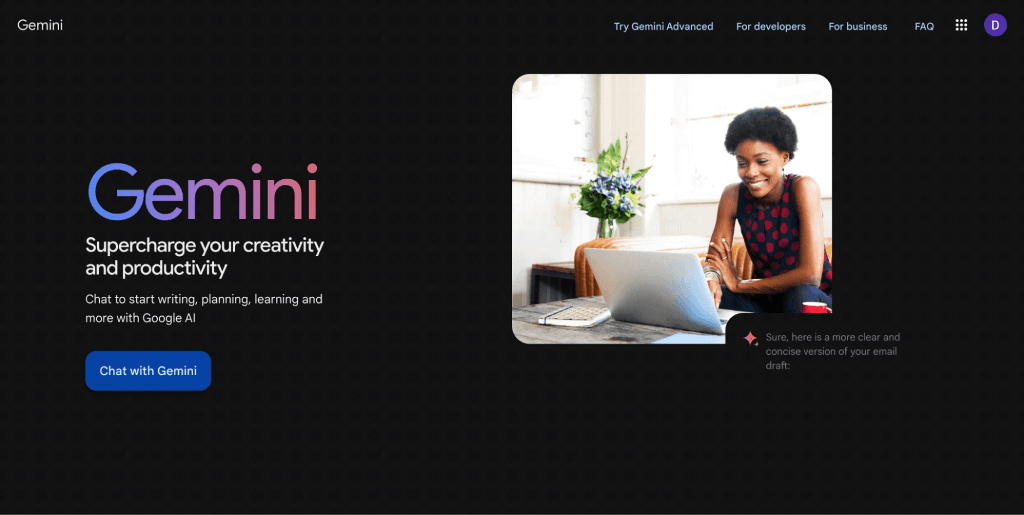
Image Source : https://ai-pro.org/learn-ai/articles/ai-explained-what-is-google-gemini
What makes Gemini special?
Firstly, it should be noted that it can combine all sorts of data. Most AI tools only use words. Gemini AI also makes use of code, music, and images. Imagine surveying a room while listening to numerous talks.
Generally, Google offers three versions. Nano is for tiny devices. Pro is great for daily tasks. Ultra is for very large projects. New users should start with Gemini Pro online. Therefore, you do not need any special gear.
Certainly, prior AIs had a single focus. Gemini, on the other hand, manages multiple tracks concurrently.This gives you better answers much faster unquestionably.
How to Start Using Google Gemini AI?
Above all go to gemini.google.com right now. Secondly, log in with your standard Google account. The web page looks clean and simple. Moreover, you will notice a big box located in the center. Last but not least, type your question there and hit enter.
Not only the settings for language are at the top, your chat history also stays on the side. This simple design keeps you focused undoubtedly. No clutter means faster results indeed.
Key Words to Know
Generally, prompting means asking smart questions. Good questions give better answers.On the whole tell the tool exactly what you need.
To be clear, the chat memory is the context window.It holds what you have already said. Tokens are the small word pieces counted. They resemble little pieces of a sentence’s puzzle.
Consequently, generative AI makes new things. It learns from patterns. Gemini creates text, pictures, or new ideas quickly.
Your First Interactions: Mastering the Art of Prompting in Google Gemini AI
Image Source: https://store.google.com/intl/en_in/ideas/articles/kw-gemini-wear-os-watches/
Creating Effective First Prompts
Start with clear, short questions. Say what you want and why. Also say how you want it delivered. For instance, “Use three bullet points to summarise this article.” Gemini works quickly as a result.
Additionally, use a simple structure for framing questions. State your role, the task, and the format. Likewise, for example: “Act as a teacher. Explain how to bake a cake. List steps by number.”
Overall, specific prompts always beat vague ones. Instead of “workouts,” ask for “top five home workout tips.” Your results will improve right away.
Using Gemini’s Visual Power
Firstly, click the image icon next to the prompt box. Secondly, upload a photo right there. Then ask a question about the picture. Try: “What breed is this dog?” Gemini instantly checks colours and details.
At this time, upload a bird photo next. Inquire: “Determine the type of this bird and provide care suggestions.” It retrieves more detailed information from its knowledge indeed.
Without a doubt, voice input works well on your phone. To clarify, tap the mic icon and speak your question aloud. This is perfect for quick needs, like describing a recipe while cooking. Try it with your own photos later today.
Making Responses Better in Google Gemini AI
Talk to Gemini in the same way that you would a human. If it replies, ask a follow-up question. Try saying: “Make that shorter” or “Add some examples.” It will build on the previous answer.
Use the thumbs up or down buttons. This guides our future chats. Because of this, a positive vote teaches the AI to favour your preferences.
Practice sharpens the tool. Start broad, then ask specific follow-ups. If the first answer misses the goal, ask again differently. Soon you will guide the AI like a master.
Practical Applications for Work and Life by Google Gemini AI
Image Source: https://vlinkinfo.com/blog/gemini-ai-everything-you-need-to-know
Google Gemini AI in boosting Your Time
Paste a long email thread into the chat box. Additionally, instruct it to “Summarise key points and suggest a reply.” It reduces the amount of time spent reading from hours to seconds.
For drafts, try: “Write a thank-you note for a job interview.” Then tell it to change the mood: “Make it sound friendlier.” This saves time on regular tasks.
Smart summaries can greatly reduce email overload. Try this on reports or meeting notes now.
Learning and Exploration: A Personal Tutor
Gemini explains hard concepts simply.Gemini simplifies difficult ideas. “Explain to a child how solar panels operate.” It uses simple language and analogies. For instance, it compares a panel to a sponge absorbing sunlight.
Create study help easily. After entering your notes, select “Turn this history chapter into flashcards.” Alternatively, say to it, “Quiz me on basic maths with five questions.” It adapts to your level of expertise.You can create a timeline of space missions. Learning becomes a chat, not a boring book read.
Google Gemini AI’s Content Creation and Idea Mapping
Use this to generate ideas: “Give me ten blog title ideas about healthy eating.” Gemini offers fresh options quickly. After you’ve chosen one, ask, “Outline that blog post.”
For social media, upload a photo. Next, say, “Caption this vacation photo.” It immediately conveys the appropriate emotion.
Map out family trips easily. It provides steps, budget estimates, and fun stops. This sparks new ideas for any project.
Key Considerations and Responsible Usage of Google Gemini AI
Image Source : https://blog.google/products/gemini/gemini-3/
Checking the Facts
All AI models make mistakes sometimes. Geminis may fabricate information or miscalculate dates. This is called making things up.
Treat the answer as a starting idea. Check big claims against trusted sources. Talk to experts for money or health questions.
Google reports about 90% accuracy for simple topics. Errors grow when you push the limits. Always check facts that truly matter.
Privacy and Data Handling for Beginners
Google saves these chats to improve the tool. You can turn off history in Data Controls. This keeps your talks private.
Never share private details like passwords or bank data. Use the web version for safe, general questions.
Dealing with Bias
AI learns from human writings. Because of this, bias can sneak in. It might lean toward one side on politics. Watch out for language that seems unfair.
Ask for “pros and cons from different points of view.” Or ask for the source of the claims. If the response seems slanted, ask again for balance. Fair use keeps your information strong.
Conclusion: Your next steps with Google Gemini
Image Source: https://www.unite.ai/gemini-2-0-meet-googles-new-ai-agents/
Getting started with Gemini is simple. Go online, type clear questions, and practice with images and voice. Soon you will chat, create, and learn easily.
Practice your prompting every day. You will master this AI gateway very fast.
Gemini is ready to boost your world now. What will you ask first?